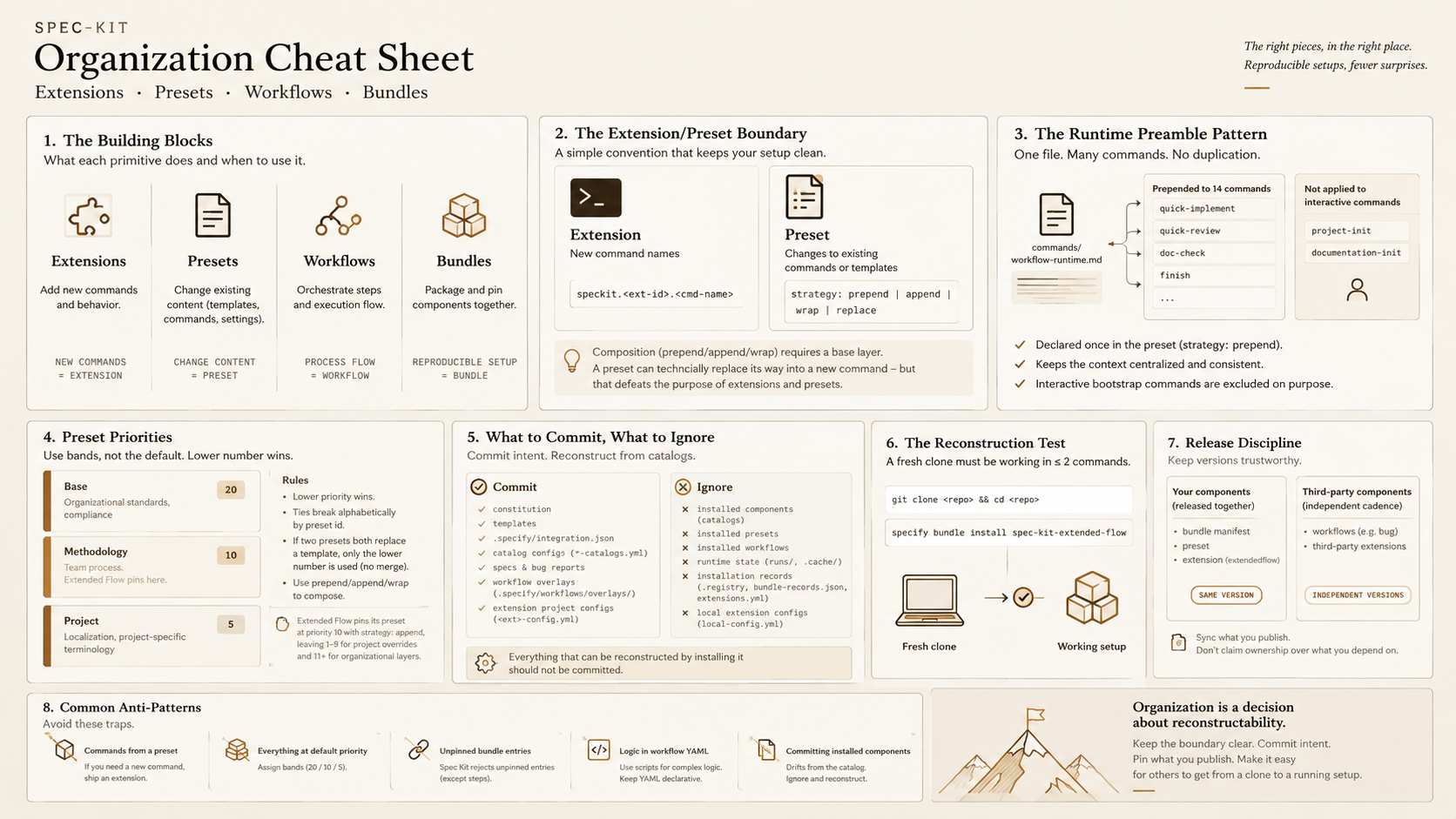
I spent the last few days cleaning up Extended Flow, the Spec-Kit bundle I maintain for a full agentic development pipeline, so I could install a clean copy into Workflow Cockpit, a terminal UI I’m building for running and reviewing Spec-Kit workflow runs. Cockpit’s own repository runs on Extended Flow as its Spec-Kit setup, so problems in the bundle show up directly in Cockpit’s development loop.
.specify/ is the directory a Spec-Kit project uses to hold its extensions, presets, workflows, and configuration. Setting one up, I kept asking myself the same questions: how do I manage this folder, and how do I avoid committing every file in it? The trap is treating all of it as ordinary project files. What belongs in git, what should be reconstructed from catalogs, and what needs a pinned version so a fresh clone means the same thing next week?
Maintainers have answered a narrower version of this before. A GitHub discussion on what to commit under .specify/ settled on a short rule: ignore the local feature pointer and per-machine config overrides, commit everything else - constitution, specs, extension config, templates, scripts. That answer makes perfect sense for a single preset or extension. It says less once a project assembles several catalog-installed bundles, presets, extensions, and workflows at once, each with its own installed copy, registry, and provenance record - the case that two still-open feature requests (#2612, #2681) ask Spec Kit to address by formally separating tool-managed assets from project-owned state.
I think Spec-Kit artifacts should be handled as packages and dependencies. Catalogs declare what is available. Bundles declare and pin what a project depends on. The repository tracks project intent and project-owned customization. Installed package copies, installation records, and runtime state should be reconstructed.
This article reflects Spec Kit and its documentation as of this writing, and the Extended Flow bundle at bundle/preset/extendedflow extension 0.16.0 (bug extension 1.0.0, Feature workflow 0.10.1, Bugfix workflow 0.2.1, Quick workflow 0.1.1). Both projects evolve; re-check current behavior before relying on specifics.
Treat Spec-Kit artifacts as packages, not project files
The core problem is that one directory tree hides three different kinds of things. If they are all treated as “files under .specify/”, repository boundaries become arbitrary and updates become harder to reason about.
I have found it more useful to separate them into three categories:
- Package definitions and catalog-published components. Extensions, presets, workflows, and bundles are versioned artifacts with their own manifests and release cadence. Catalogs declare which packages are available to install.
- Project intent and project-owned customizations. Bundle declarations, catalog configuration, constitution, specs, extension project config, and workflow overlays describe what this project wants and which local customizations it owns.
- Installed artifacts and runtime state. Installed copies under
.specify/extensions/,.specify/presets/, and.specify/workflows/, plus registries, bundle records, caches, and run state, are outputs of installation and execution.
A catalog is a plain JSON index. Each entry names a package, pins its version, and points at where to download it. This is the bugfix bundle entry as published in Spec Kit’s own bundle catalog:
{
  "schema_version": "1.0",
  "catalog_url": "https://raw.githubusercontent.com/github/spec-kit/main/bundles/catalog.json",
  "bundles": {
    "bugfix": {
      "id": "bugfix",
      "name": "Guided Bug Fix",
      "version": "1.0.0",
      "description": "Orchestrated bug triage: assess a bug report, review behind a human gate, apply the fix, and verify with tests.",
      "author": "GitHub",
      "license": "MIT",
      "download_url": "https://raw.githubusercontent.com/github/spec-kit/main/bundles/bugfix/bundle.yml",
      "repository": "https://github.com/github/spec-kit",
      "requires": { "speckit_version": ">=0.9.0" },
      "provides": { "extensions": 1, "presets": 0, "steps": 0, "workflows": 1 },
      "tags": ["bug", "triage", "workflow", "qa"],
      "verified": true
    }
  }
}
Extensions, presets, and workflows are listed the same way under their own top-level key in their own catalog.json. The download location can point at any host the project can reach, so a company can serve the same entries from an internal catalog instead of GitHub. A project points at the catalogs it trusts through its .specify/*-catalogs.yml files, which are project intent and stay committed.
In practice, that means keeping declarations and project-owned customizations in the repository, while installed packages and runtime state can be recreated when needed. Spec Kit does not enforce that repository policy for you. It gives you the primitives. Which files declare a dependency and which are only the materialized result is still a decision for the project.
Choose the package that owns the behavior
The extension-versus-preset distinction becomes confusing when you start from file locations alone. Both can affect what the agent sees, and a preset can technically do more than it should. That is why teams need an ownership rule before they start composing packages.
Spec Kit distinguishes between extensions and presets. Extensions are the conventional home for new command names. Presets modify existing commands or template content, and with strategy: replace they can also materialize a brand-new command on their own. That makes the boundary architectural, not hard-enforced, but the distinction still reflects the intended semantics of the package types. What Spec Kit does enforce are the composition strategies documented in the presets reference: prepend, append, and wrap require an existing base layer to compose onto. When that base is missing, Spec Kit skips the command and emits a warning.
This split matches the shipped manifests: extension.yml contributes named behavior, and preset.yml changes how existing behavior is rendered and composed. Once ownership is clear, composition stops being accidental.
Compose packages deliberately
A Spec-Kit project usually installs multiple packages, and their interaction is where drift can appear. Two composition problems show up in practice:
- Shared cross-cutting instructions copied into many commands drift over time.
- Competing preset changes need a deliberate precedence policy or resolution becomes arbitrary.
One runtime preamble instead of multiple copies
The first problem showed up immediately in Extended Flow. Spec Kit workflows execute their commands in batch mode by design, so they run unattended and do not stop to ask a human question. I also wanted that behavior to stay inside the project. Copying the instruction into every command would have worked for one release and then drifted.
So I wrote it once instead. Spec Kit lets one preset entry compose onto many commands, so I pointed fourteen type: command entries at the same file - commands/workflow-runtime.md - each with strategy: prepend (see preset.yml). That keeps the policy in one place; the commands themselves stay free of duplicated boilerplate. I left project-init and documentation-init out because a human runs them before the flows start, so the preamble doesn’t apply.
Use priorities to define how presets compose
The second problem is less visible until two presets overlap. Every preset defaults to priority 10, and ties break alphabetically by preset id (see the Spec Kit presets reference). Leave everything at the default and your effective stack is technically valid but operationally arbitrary.
Use priority to actually control the layering these artifacts create. Lower priority wins. The strategies fall into two groups that behave differently against the layer below. replace overrides: when two presets both replace the same template, only the lower number takes effect and the other is ignored rather than merged. append, prepend, and wrap compose: the higher-precedence preset, the one with the lower number, adds to that layer instead of overwriting it.
Extended Flow’s bundle.yml pins its preset at priority 10, while the actual file-level composition strategies live in preset.yml. That leaves room for project overrides above it and organizational layers below it without changing the bundle itself.
Commit intent; reconstruct installations
The practical failure mode here is ending up with two competing truths. Catalogs and bundle manifests describe which packages the project depends on and which versions it expects. The other lives in checked-in installed copies and registries. The moment those drift apart, the repository no longer tells you which truth to trust.
Spec Kit’s own default is intentionally narrow. specify init scaffolds a managed .specify/.gitignore that contains exactly two patterns (see the Spec Kit core reference):
feature.json
extensions/*/local-config.yml
That excludes only machine-local state. For Extended Flow projects, I use a stricter policy: ignore anything that can be recreated by installing a declared dependency. Anything pulled from a catalog and not meant to be edited locally should not be committed.
Add these rules to the managed file:
# Installed from catalogs. Reconstructed with `specify bundle install`.
.specify/extensions/*/*
!.specify/extensions/*/*-config.yml
.specify/presets/*
.specify/workflows/*
!.specify/workflows/overlays/

# Runtime state, caches, and backups.
.specify/workflows/runs/
.specify/workflows/.cache/
.specify/extensions/.cache/
.specify/extensions/.backup/

# Installation-state records. Rebuilt by the bundler on reconstruction,
# and stale copies can make it believe an ignored component is present.
.specify/extensions/.registry
.specify/bundle-records.json
We need to be specific here:
- Extension project config (
<ext>-config.yml) is project intent. It is not catalog-derived, so it stays tracked. Only the machine-locallocal-config.ymlstays ignored. - Workflow overlays (
.specify/workflows/overlays/) are project-owned customizations. The workflows reference explicitly keeps them outside installed workflow directories so they survive updates.
The installation-state records need the same treatment as the installed package copies. The bundler resolves what is already installed primarily through these registries and records, not by inspecting the filesystem tree alone. If they are committed while the components they describe are ignored, a fresh clone can claim a component is already installed when its files are absent.
.specify/extensions.yml looks like it belongs on that list - it does record which extensions are installed - but it is not what gates a fresh install. That check reads only .specify/extensions/.registry; extensions.yml is enablement and hook configuration, which is why the extension user guide recommends committing it.
The three categories map onto concrete paths as follows:
| Path or pattern | Category | Commit | Restored by |
|---|---|---|---|
constitution, templates |
Project intent | ✅ | - |
specs/, bug reports |
Project intent | ✅ | - |
| Bundle declaration | Project intent | ✅ | - |
.specify/*-catalogs.yml |
Project intent | ✅ | - |
.specify/integration.json |
Project intent | ✅ | - |
.specify/extensions.yml |
Project intent | ✅ | - |
.specify/extensions/<ext>/<ext>-config.yml |
Project intent | ✅ | - |
.specify/workflows/overlays/ |
Project-owned customization | ✅ | - |
.specify/extensions/*/* |
Installed extension copies | ❌ | specify bundle install |
.specify/presets/* |
Installed presets | ❌ | specify bundle install |
.specify/workflows/* |
Installed workflows | ❌ | specify bundle install |
.specify/extensions/.registry |
Installation record | ❌ | rebuilt by the bundler |
.specify/bundle-records.json |
Installation record | ❌ | rebuilt by the bundler |
.specify/workflows/runs/ |
Runtime state | ❌ | regenerated on run |
.specify/workflows/.cache/, .specify/extensions/.cache/, .specify/extensions/.backup/ |
Runtime state | ❌ | regenerated by the tooling |
.specify/feature.json |
Machine-local pointer | ❌ | recreated locally |
.specify/extensions/*/local-config.yml |
Machine-local override | ❌ | recreated locally |
The negation syntax is part of the design. .specify/extensions/*/* ignores the contents of each extension directory but not the directory itself, which is what allows a top-level config file to be re-included. Ignoring .specify/extensions/ wholesale would make that impossible.
If bundle declarations are the source of truth, the next step is to prove that they are actually sufficient.
Make a fresh clone the acceptance test
A declarative dependency story is only real if a new checkout can reconstruct it. Otherwise the repository still depends on human memory.
A useful acceptance test is whether a fresh clone can reach a working state with an easy init command:
git clone <repo> && cd <repo>
specify bundle install spec-kit-extended-flow
If restoring the project requires more than that - manual specify extension add calls, remembered priorities, or a wiki page that lists extra steps - the dependency declaration is incomplete. A missing step usually means one of three things is absent from the package model: a bundle dependency, a version pin, or project-owned customization that should have been committed.
Run this test against a real fresh clone, not by deleting directories from an existing checkout. Deleting .specify/extensions/, .specify/presets/, and .specify/workflows/ from a working tree also deletes tracked project intent such as extension project config, workflow overlays, and installation metadata that should stay committed. Clone into a clean directory, run the install command, and confirm the resulting installed versions match what the bundle pins.
That reconstruction test answers the present-tense question. Reproducibility over time depends on versioning discipline.
Pin versions so reconstruction means the same thing tomorrow
Package management is temporal as well as structural. It is not enough that a project can be reconstructed today. The reconstructed result needs to mean the same thing when someone repeats the install later.
That is why bundles matter. The Spec Kit bundles reference defines a bundle as a versioned composition layer over extensions, presets, workflows, and steps, and bundle info expands the pinned component set. Spec Kit rejects unpinned extension, preset, and workflow entries during bundle validation. If installed components carry one version in their own manifest and a different one in the bundle pin, the bundle stops being a trustworthy description of the environment.
Extended Flow keeps a hybrid release model, and this is my policy, not something Spec Kit enforces. The components the project itself publishes - the bundle manifest, the preset, and its own extendedflow extension - are released together and share one version number. Workflows and third-party extensions are different. They are foreign components, maintained on their own cadence, so forcing them onto the bundle’s version would misstate ownership of that release cycle.
An alternative is to version each primitive independently and pin those versions in bundle.yml. That works when components genuinely evolve on different cadences. What does not work is an accidental mixture with no stated rule - some primitives share versions, others float loosely, and the bundle version no longer describes its contents. Reconstruction then becomes time-sensitive in exactly the wrong way.
The easiest way to see whether the model holds is to look at what breaks when it does not.
Failure modes come from breaking the package model
The anti-patterns here share one cause: each treats package behavior as ad hoc project files.
- Commands from a preset. A preset that registers
speckit.someext.cmdviareplacewithoutsomeextinstalled can work technically, but it hides new behavior inside the wrong package type. - Undeclared preset precedence. When two presets change the same template and both keep the default priority
10, resolution falls back to alphabetical order by preset id. - Missing or stale bundle pins. Spec Kit expects extension, preset, and workflow entries to be pinned, and stale pins still break reproducibility by describing a different environment than the one people actually install.
- Logic in workflow YAML. Shell steps that grow beyond one command blur the boundary between orchestration and packaged runtime behavior. The workflow should declare sequence; scripts shipped by a preset or extension should implement the logic. My own recommendation once those scripts grow past a handful of lines: extract them into a separately versioned, published package rather than letting them keep growing inside a preset or extension.
- Committing installed components or their registries. A checked-in copy of a catalog extension, preset, or workflow drifts from the declared dependency the moment someone updates it.
All of these failure modes blur the distinction between declared dependencies and installed artifacts.
Package management is the operating model
Spec Kit already gives the primitive types. The real design choice is how you operate them together. In my view, the cleanest model is to treat extensions, presets, workflows, and bundles as packages, not as a loose collection of project files under .specify/.
Extended Flow’s own repository reflects the split now: extensions and presets are pinned, .specify/extensions/ and .specify/presets/ are gitignored, and a fresh clone rebuilds them with one install command. The next test is whether it holds up in Workflow Cockpit, the project this cleanup was for.